“Major reform is never born of chance. It is the fruit of a shared vision, patient dialogue, sustained cooperation, and collective commitment in service of the common good,” writes Awa Diouf Cissé, EIFL Copyright and Libraries Coordinator in this article published in Senegal’s ‘Le Soleil’ newspaper.
Milica Ševkušić, EIFL Open Access Programme Project Coordinator, will speak at the Female Academic Network for Africa Research and International Collaboration (FANARC) Conference. The theme of the conference is ‘Research Visibility and International Collaboration’.
Milica will deliver a presentation titled 'Digital Tools for Research Visibility'. The conference is hosted by the Adventist University of Africa. Registration can be found here.
Rima Kupryte, Director of EIFL will attend the 18th Berlin Open Access Conference (B18) organized by OA Forward. B18 will convene senior leaders from research institutions, library consortia, and funding bodies alongside major publishers to address a central question: What must change now to realign scholarly publishing with the interests of the research community?
Join the EIFL online meet-up of open science trainers and discuss experiences with running workshops for research offices. Amy P. A. Asimah and Dominic Dankwah will also share their experiences of conducting open science training in Ghana.
EIFL has renewed the agreement with Royal Society Publishing for a further three years until December 2029. The agreement provides EIFL partner countries with free or deeply discounted access to eight high-impact journals in the physical and biological sciences, and waived Article Processing Charges (APCs) for open access publishing in fully open access and hybrid journals.
The Public Knowledge Project (PKP) has officially released Open Journal Systems 3.5 as its LTS (Long-Term Support) version. This is the moment we’ve been preparing for. As we shared earlier, our team has been tracking every 3.5 milestone and testing theme and plugin compatibility in our own staging environments. Now we can say it clearly: it is safe to upgrade to OJS 3.5.
In this post we walk through what 3.5 brings for editors and journal managers, a few things worth knowing before you upgrade, and how we handle migrations smoothly — whether you’re coming from OJS 2, an older OJS 3.x build, or OJS 3.3.
Why it’s safe to move now
Because 3.5 now carries the LTS label, it will receive long-term bug fixes and security patches. Upgrading today puts your journal on a stable, well-supported branch for years to come — ideal for journals that prioritise reliability.
One quick note on the upgrade path: per PKP’s support policy, if you’re on a version older than 3.3, you upgrade to 3.3 first, then to 3.5. Most of our clients already run 3.3, so they can move straight to 3.5. And if you’re still on a legacy OJS 2 installation, there’s nothing to worry about — we handle the full journey, from OJS 2 to OJS 3 and all the way to 3.5.
Whatever version you’re on, there’s one clear, managed path to OJS 3.5 LTS.
What OJS 3.5 brings to editors and managers
Six of the headline changes editors and journal managers will notice in OJS 3.5.
A redesigned editorial dashboard. Tracking submissions is far clearer now. New filtered views help you find manuscripts at any workflow stage, while refreshed status icons and action buttons reduce the number of clicks for everyday tasks. The interface looks noticeably different from 3.3, so a short adjustment period for your team is normal.
An automatic editorial board (masthead). You no longer fill in your editorial board as free text. You assign people to the relevant role and the system compiles the masthead automatically — with optional start and end dates per member. Your board list stays accurate and consistent with almost no manual upkeep.
Invitation-based user management. To grant someone a role such as editor, editorial board member, or manager, you no longer create their account directly. You send an invitation, and the person joins by accepting it. It’s a more privacy-friendly approach that also improves data accuracy.
ORCID and ROR built in. ORCID, which previously required installing a separate plugin, now ships in the core. ROR (Research Organization Registry), which links author affiliations to standardised, global identifiers, is integrated by default too.
A “Highlights” feature on your homepage. Showcase calls for papers, eye-catching visuals, or standout articles right on your homepage, with an optional rotating carousel. (Availability may vary by theme.)
Author-suggested reviewers. Authors can propose a reviewer’s name, affiliation, or email during submission, and that suggestion is passed to the editor.
Beyond these, 3.5 adds multiple author affiliations, basic JATS XML support, the ability to set a minimum number of reviewers per submission, and improved multilingual handling.
What to know before you upgrade
Let’s be candid: 3.5 isn’t a cosmetic refresh — it’s a structural release. That’s exactly why it’s worth planning the move properly.
Some workflow habits change. The automatic editorial board and the shift to invitation-based user management will change a few steps your team is used to. A brief walkthrough after the upgrade is usually all it takes.
Email configuration matters. Invitations and notifications are delivered by email, so your server’s email setup needs to be working reliably. We always verify this as part of the upgrade.
Custom themes and some plugins may need updating. The infrastructure changes in 3.5 can require adapting custom themes and certain plugins, and your server environment needs to be current (a modern PHP version). We test all of this beforehand and make the necessary adjustments.
Staging first, then live. We always run the upgrade on a copy (staging) environment first, confirm everything works, and only then move it to production. Full backups and data integrity are our standard, non-negotiable.
Whatever version you’re on, we manage the upgrade
Full OJS 2 to OJS 3 migration
Upgrades from OJS 3.1 / 3.2 / 3.3 to OJS 3.5
Theme and plugin compatibility, data integrity, and zero-loss transitions
Complete pre-upgrade backups and staging verification
Ready to upgrade? Get in touch
If you’d like to move to OJS 3.5, want advice on the best path for your current version, or have any other questions, reach out to us. Let’s plan the smoothest possible transition together — preserving your data, your theme, and your workflow.
Scholarly publishing is quietly leaving the page behind.
For centuries an article’s address was its page range: pp. 245–260. That made sense when a journal was a physical object — paper had to be bound, and binding meant every article started somewhere and ended somewhere. But the page range was never really about the article. It was about the paper.
The paper is going away. Journals increasingly publish each article the moment it clears review — sometimes while later revisions are still in flight — rather than holding it for a quarterly issue. “Continuous publishing” is becoming the norm; the volume/issue/year container, itself a relic of print scheduling, is loosening and in some venues disappearing. Output is shifting from PDF (a print imitation) to native HTML. An article, in other words, is starting to behave much more like a web page than a page in a book.
When there is no issue to sit inside, “starts on page 245” stops meaning anything. What identifies the article instead is an article number (also called an elocation-id): PLoS ONE 15(4): e0231470, Electron. J. Combin. 27 (2020) P2.16, J. Vac. Sci. Technol. … 051101. The death of the page number isn’t a fashion. It’s the unavoidable consequence of the medium changing (paper to screen) and the rhythm changing (batched issues to continuous flow).
That is the gap this plugin was built for.
The problem in OJS today
Open Journal Systems has no dedicated field for an article number. So editors do the only thing they can: they type it into the Pages field. That single workaround quietly corrupts metadata everywhere downstream.
Google Scholar reads the value as both citation_firstpage and
citation_lastpage — a fake one-page range, and a broken bibliographic record.
Crossref expects the value in a dedicated <item_number>, not in
<pages>; a page-field value is deposited in the wrong place.
PMC / PubMed require either a first page or an <elocation-id>; a number
buried in page text can’t produce a valid one, and the deposit risks rejection.
Citation styles format article numbers specially — “Article e298”,
“Art. no. e298” — which a page-field value can never trigger.
PKP has known about this since 2019 (issue #4695). The core defined an internal property for it but left the export, citation, and editorial pieces unfinished. This plugin completes the chain — and does so in a way designed to hand back to core cleanly if core ever finishes it.
With no article-number field, editors put it in Pages — and the metadata breaks in four places at once.
What it does
A single generic plugin covers the article number end to end:
Where
What happens
Editor
An “Article Number” field on the publication form and in QuickSubmit. Uniqueness is enforced per journal; a published article’s number is locked so a deposited coordinate can’t change silently.
Reader
The number is shown on the article page, in any theme.
Google Scholar
The fake firstpage/lastpage pair is suppressed when a number is set.
Crossref
<item_number item_number_type="article_number"> is injected and <pages> dropped; the output validates against Crossref’s schema.
JATS (PMC/SciELO)
<fpage>/<lpage> is replaced with <elocation-id>, JATS4R-safe.
Citations
Style-aware mapping across the ten bundled CSL styles — e.g. APA “Article e0001”.
The standards, mapped honestly
An article number is carried differently by every downstream system, and getting that mapping right is the work:
System
Correct carrier
Crossref
<publisher_item><item_number item_number_type="article_number"> — mutually exclusive with <pages>
JATS (PMC, SciELO)
<elocation-id> — replaces <fpage>/<lpage>
PubMed / PMC
first page orelocation-id must exist
Google Scholar
(no tag) — so don’t emit a fake page range
CSL / citeproc
the number variable
The plugin carries the same number into each system through its correct field — read-only against your data.
An engineering stance, not just a feature
We treated this as structural infrastructure, and made a few promises we don’t break:
It never touches your data. The plugin only ever writes its own value. It never writes to the Pages field or any other core field — that’s a hard architectural guarantee, independently verified, not a convention.
It never forks anything. Crossref, JATS, Scholar and citation output are amended by attaching to existing extension points — no export plugin, and no CSL style file, is ever copied or edited.
It’s opt-in, per journal. Off by default. When off, OJS behaves exactly as before.
It’s built to hand off to core. The value is stored under PKP’s own internal property name, workNumber. If a future OJS core ships the field natively, the plugin detects it, steps aside, and your data is already in the right place under the right name — a zero-migration hand-off. The plugin is designed to be always usable, or cleanly transferable. Either way, the journal’s data is safe.
Honest about the edges
Good tools are honest about what they don’t do. Two limits are worth stating plainly, because both come from the ecosystem, not from cutting corners.
Citation styles. Of the ten bundled styles, seven render the article number cleanly (ACM, ACS, APA, Chicago, Turabian, Vancouver — and MLA, after we fixed a double-printing bug). Three — ABNT, Harvard and IEEE — never expose the CSL number variable for journal articles and force a “p.” (page) label onto the value. The number is present and correct in those styles, but shown with a page label. Removing that would mean forking the bundled CSL files, which we don’t do.
RIS / BibTeX downloads. The article number is present and correct in both, but in a page field (RIS SP, BibTeX pages) rather than a canonical machine-readable one. Writing it to BibTeX’s eid would require forking a CSL file. For RIS we actually found a fork-free way to write the C7 (“article number”) tag — and chose not to ship it, because C7‘s round-trip isn’t guaranteed across reference managers, and an uncertain gain wasn’t worth a permanent maintenance burden. The canonical, standards-compliant path is already covered where it matters most: Crossref and JATS.
We’d rather tell you exactly where the line is than pretend there isn’t one.
Independently reviewed
Before release the plugin went through a full pre-release security and compatibility review: no Critical or High findings, clean on PHP 7.4 and 8.1, zero core-file changes, no export-plugin forks. The full test matrix ships with the plugin.
Moving your existing archive — safely
If your journal has been storing article numbers in the Pages field for years, there’s a migration tool — available both from the plugin’s settings panel (for one journal) and as a command-line tool (for large archives or every journal at once).
It’s a derivation, not a move. The tool reads the Pages value and copies it into the Article Number field; it never modifies Pages, in any mode. Genuine page ranges like 245–260 are never treated as candidates, ambiguous values are flagged for review, and an “undo” removes only what the tool itself created. Your source data is never at risk.
See it live
The same plugin, two very different themes — proof that display is theme-independent:
OJS default theme: [an issue where every article is identified by an
article number](https://ojs-services.com/ojsdemo/index.php/pub/issue/view/24) · example article
Atlas premium theme: [the same, in a premium
layout](https://themes.ojs-services.com/index.php/atlas/issue/view/83) · example article
Open the “How to Cite” box on any of them: the citation reads Article e0001, not a page range — and the article’s Crossref and JATS metadata carry it in the correct field.
Availability
The plugin is free and open source (GPL v3), targeting OJS 3.3 (PHP 7.4–8.1), with ports to 3.4 and 3.5 planned. It’s on GitHub at github.com/ojs-services/articleNumber.
If you’d like help deploying it — or migrating an existing archive of page-field article numbers — that’s what we do: OJS-Services.com.
Page numbers described where an article sat in a stack of paper. As that stack disappears, journals need a way to identify an article on its own terms. This plugin is a small, careful piece of that infrastructure — built read-only against core, mapped to the standards, honest about its edges, and ready to hand back to OJS core the day core is ready for it.
We didn’t want to follow where publishing is going. We wanted to build for it.
Iryna Kuchma, EIFL Open Access Programme Manager, will facilitate a webinar for the EIFL partner in DRC - Consortium des Bibliothèques Académiques du Congo. The webinar will outline the opportunities offered by the EIFL-negotiated agreements for open access (OA) publishing. Participants will learn how to identify eligible journals, submit a manuscript, understand waivers and discounts in Article Processing Charges (APCs), and adopt best practices to enhance the visibility and impact of their research.
In an open letter to the European Parliament, EIFL joins over 35 organizations calling on the European Parliament to reject the introduction of actor-specific licences for access to public sector information and data in Europe. To address concerns about market dominance and unfair competition by very large enterprises, mechanisms for differentiated charging should instead be used.
Two OJS features that look almost identical — but structure your journal in completely different ways. Here’s what Sections and Categories each really do, and why a section sometimes refuses to be deleted.
If you manage a journal in Open Journal Systems (OJS), sooner or later you run into two features that look like they do the same thing — Sections and Categories — and a frustrating moment where OJS refuses to delete a section, insisting “someone is still using it,” even though you’re sure no article does.
Both problems come from the same misunderstanding. Once you understand what each feature actually is, everything falls into place: your Table of Contents gets cleaner, your indexing gets more reliable, and readers get a genuinely useful way to browse your journal.
This guide clears it up with plain language and five real-world examples.
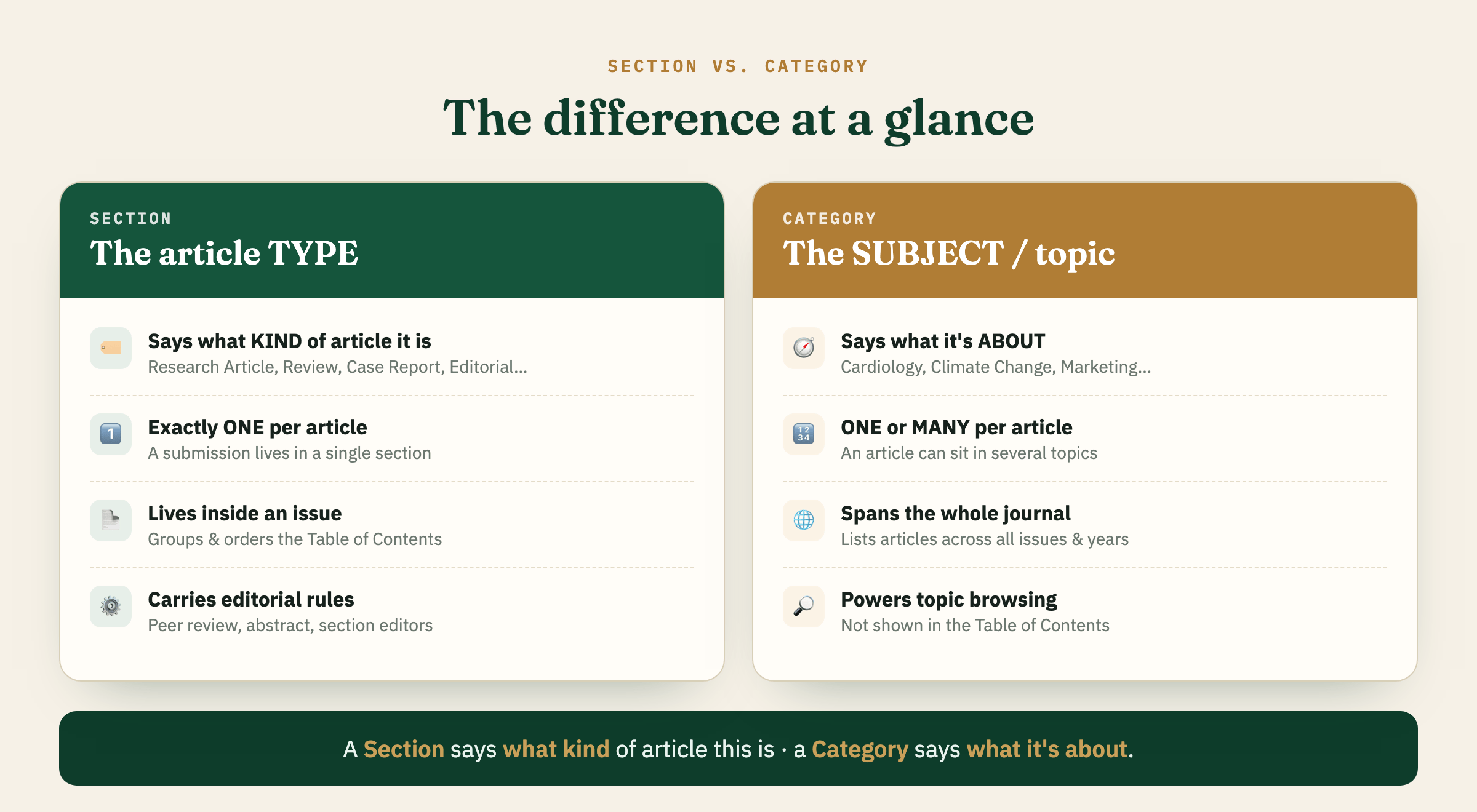
Section vs. Category at a glance — a Section is the article type; a Category is the subject.
If you remember only one line: **a Section says what kind of article this is; a Category says what it’s about.**
What a Section really is
A Section is the structural building block of an issue. When you open any issue’s Table of Contents, the headings you see — “Research Articles,” “Reviews,” “Editorial” — are sections.
Key properties:
One section per submission. During submission, an article is placed in a single section. It cannot live in two sections at once.
It structures the Table of Contents. Sections group and order the articles within an issue.
It carries editorial rules. A section defines whether items are peer-reviewed, whether an abstract is required, word limits, section policy, and which section editors handle it.
It travels with the record. The section is part of your issue structure and is carried through your journal’s OAI-PMH feeds and native XML exports, which is how harvesters and indexes read your content’s structure.
Technically, a section is simply the single main editorial division a submission is attached to — OJS itself doesn’t force it to mean “type,” and some journals legitimately use sections for a discipline, a standing theme, or a special collection. But because a section maps so naturally onto article type, that’s how the overwhelming majority of well-run journals use it:
Research Article · Review Article · Case Report · Short Communication · Editorial · Letter to the Editor · Book Review
A note worth making: some journals create a single generic section called simply “Articles” and drop everything into it. OJS will let you do this, but it’s not ideal — indexers and readers still want to know the article type. If you go this route, make sure the article type is clearly stated inside the PDF (e.g., a “Research Article” label on the first page). Article type is one of the things indexes and reviewers check most often, so it should be clearly stated somewhere the reader can see it — even if the exact requirement varies from one standard to the next.
And this isn’t only house style. Publishing standards such as JATS XML (used by PubMed Central and many indexing services) formally enumerate article types — research-article, review-article, case-report, editorial, letter, and so on — through a dedicated article-type attribute. Keeping your sections aligned with these recognized types makes your exported metadata cleaner and more machine-readable downstream.
A Category is a completely different animal. It is not a property of the article in the bibliographic sense — it’s a browsing and listing tool for readers.
Key properties:
A subject/topic layer. Categories organize your articles into thematic collections (“Cardiology,” “Public Health,” “Renewable Energy”).
Multiple categories per article. A single article about, say, air pollution and childhood asthma can sit in both “Environmental Health” and “Pediatrics” at the same time.
Journal-wide, not issue-bound. When a reader clicks a category, OJS lists every article in that topic — no matter which issue or year it was published in.
It has its own page and a browse block. Each category gets a dedicated page listing its articles; you can also enable a “Browse by Category” block in the sidebar so readers can explore topics directly.
It appears on the article landing page, linking readers to related articles — but it does not appear in the issue’s Table of Contents, and it normally does not appear in the PDF.
It can be nested. Categories support one level of parent/child hierarchy (e.g., “Clinical Medicine” → “Cardiology”), which sections cannot do.
In other words: sections describe this article, in this issue; categories describe a theme, across the entire journal.
Why OJS won’t let you delete a section
Here’s the scenario that starts most of these conversations:
“I want to delete a section, but OJS says someone is using it. But not all my articles use it — so why won’t it let me?”
The rule is stricter than people expect: **OJS blocks deletion if even one submission is still assigned to the section. “Most articles don’t use it” isn’t enough — you need zero** submissions attached.
And the culprit is usually a submission you weren’t thinking about:
an old article sitting in a back issue,
a declined or archived submission (these still count),
or an incomplete draft parked in the submission queue.
Do not force the deletion. If a section is removed while submissions are still attached to it, OJS can orphan those submissions — their section link becomes empty, and they can disappear from the interface entirely. That’s a data-integrity problem you don’t want.
The safe procedure:
Find every submission still assigned to the section. Check all issues (including back issues), the active queue, and the Archives (declined/incomplete included).
Open each one → Publication tab → reassign it to the correct section.
When the count reaches zero, OJS will let you delete the section cleanly.
Prefer to keep history intact? Deactivate the section instead of deleting it. It stays valid for already-published articles but stops accepting new submissions.
Five example journals: same sections, different categories
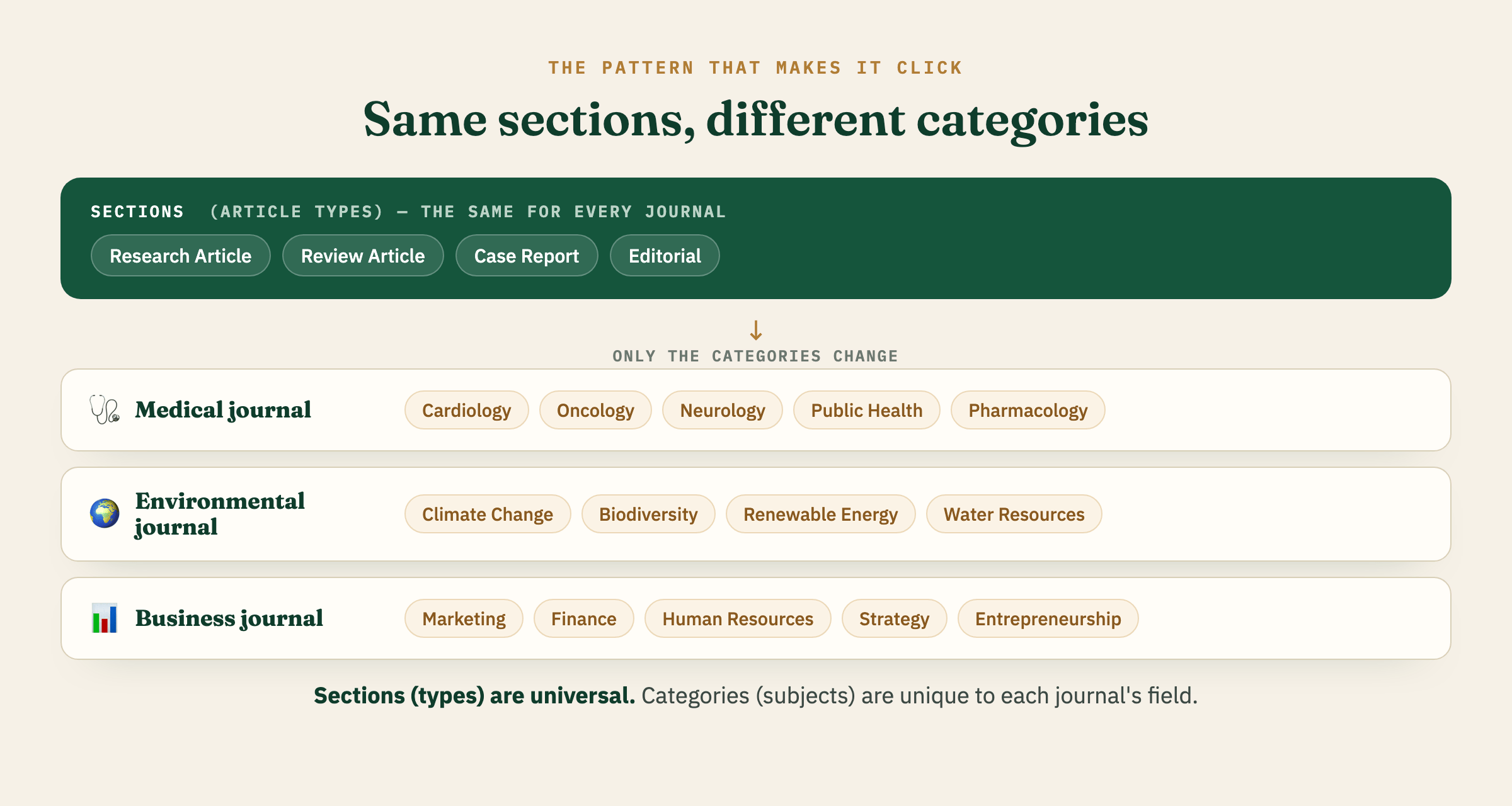
Here’s the pattern that makes everything click. Notice that the Sections (article types) stay almost identical from journal to journal — because article types are universal. What changes journal to journal is the Categories, because subjects are specific to each journal’s field.
The sections (article types) stay the same; only the categories (subjects) change from journal to journal.
1. A general medical journal
Sections (types): Research Article · Review Article · Case Report · Clinical Image · Editorial · Letter to the Editor
Categories (subjects): Cardiology · Oncology · Neurology · Infectious Diseases · Public Health · Pharmacology
A single case report on a heart-drug interaction could sit in both “Cardiology” and “Pharmacology” categories — while its section stays simply “Case Report.”
2. An environmental science journal
Sections (types): Research Article · Review Article · Short Communication · Perspective · Editorial
A reader clicking “Renewable Energy” sees every relevant article from 2019 to today, whether it was a full research article or a two-page short communication.
3. An education journal
Sections (types): Research Article · Review Article · Case Study · Book Review · Editorial
Categories double as a de facto “explore by discipline” menu for readers who don’t care which issue an article appeared in.
5. A multidisciplinary / sustainability journal (categories aligned to the UN SDGs)
Sections (types): Research Article · Review Article · Short Communication · Commentary · Editorial
Categories (subjects): Quality Education · Good Health & Well-being · Clean Water & Sanitation · Affordable & Clean Energy · Climate Action · Sustainable Cities
Here categories act as a thematic index tied to a well-known framework — perfect for a browse block, and a single article can naturally serve more than one goal.
The mistake to avoid: mixing the two lists
The confusion almost always shows up the same way — the same labels appearing in both lists:
❌ Don’t do this
Sections: Original Research · Pharmacology · Clinical Medicine
Categories: Original Research · Pharmacology · Clinical Medicine
Here “type” and “subject” are tangled together, so neither list does its job: the Table of Contents is muddled, and topic browsing is meaningless because the topics duplicate the types.
✅ Do this instead
Sections (types): Original Research Article · Review Article · Case Report · Editorial
Categories (subjects): Pharmacology · Clinical Medicine · Medicinal Plants · Drug Safety · Hospital Practice
Same content — but now the Table of Contents is clean, and readers can still browse every topic across all issues. Keeping the two lists non-overlapping is exactly the right instinct; it simply works best when **Sections carry the type and Categories carry the *subject***.
Best-practice recommendations
Keep your section list short and type-based. Six to eight article types is plenty. Long, overlapping section lists make the Table of Contents messy and confuse both authors and indexers.
Use categories for subjects — and let them overlap freely. Multiple assignment is a feature, not a bug. That’s what makes topic browsing useful.
Turn on the Browse block (Website Settings → Appearance → Sidebar) so categories are actually visible to readers. Categories with no browse entry point are invisible work.
Never overload one field with both jobs. If you find yourself creating a section called “Cardiology,” that’s a sign a category is what you actually want.
State the article type in the PDF, regardless of how your sections are set up. This is what indexes look for.
Deactivate, don’t delete, when you retire a section that still holds published history.
FAQ
Can an article belong to two sections? No. One section per submission. If you need “an article that’s both a research article and belongs to the cardiology theme,” the theme goes in a category.
Can an article belong to two categories? Yes — as many as make sense.
Do categories affect my DOIs or Crossref deposit? No. DOI/Crossref deposits are article-level and don’t depend on categories. Categories are purely a website browsing feature.
Why does deleting a section feel so hard? Because OJS is protecting your data. A section with even one attached submission can’t be deleted, and forcing it risks orphaning those submissions. Reassign first, then delete.
Still unsure how to structure your journal’s sections and categories — or need help cleaning up an existing setup? OJS-Services.com supports 500+ journals across 29 countries with exactly this kind of configuration and migration work.
Iryna Kuchma, EIFL Open Access Programme Manager, will speak at the training session on Open Research in Practice: Data Management, Sharing, Transparency and New Models of Scholarly Communication, hosted by the Southern African Research and Innovation Management Association’s Research Output, Outcomes and Impact Community of Practice.
Reports from projects aiming to strengthen the quality and sustainability of African no-fee open access (OA) publishing are continuing to come in, and we take pleasure in sharing results from three projects, in Mozambique, Nigeria and South Africa.
EIFL’s comments to the European Commission's Call for Evidence supporting a review of the 2019 Copyright in the Digital Single Market (DSM) Directive focus on two specific areas: facilitating research and sharing the results of publicly-funded research.
EIFL will host a working session on Financial sustainability planning for eight grantees of the ‘Collaboration for sustainable open access publishing in Africa’ project. The grantees are publishing 14 no-fee (Diamond) Open Access (OA) journals and are developing financial sustainability strategies and action plans for their journals.
Join the EIFL online meet-up of open science trainers, where Jonathan England, OpenAIRE’s Open Science Training Specialist, will explore accessibility in open science training and share practical approaches to designing more inclusive learning experiences. The presentation will be followed by a discussion on how institutions strategically plan open science training.
Public librarians in Africa are invited to an online capacity-building event focused on community needs assessment as the key to developing a successful library service or programme.

 Login
Login